

The Invisible Cost of Poor Shape: Why Ergonomics is a Smart Investment
For many gamers, the search for a high-performance mouse often starts and ends with the sensor specification. We look for the highest DPI, the lowest latency, and the most aggressive polling rates. However, in our experience handling thousands of customer support inquiries and warranty returns, the primary reason a "technically perfect" mouse is returned isn't a sensor failure—it’s physical discomfort.
Choosing a mouse based solely on price-to-spec ratios while ignoring shell geometry is a common pitfall. A shape that forces your hand into an unnatural position creates "anatomical debt." This manifests as micro-strains in the wrist, fatigue during long sessions, and eventually, a decrease in competitive performance. For the budget-conscious gamer, a truly ergonomic shape is a value proposition; it ensures that your investment remains usable for years without requiring expensive medical interventions or frequent replacements due to "hand-feel" fatigue.
In this guide, we will break down the science of mouse geometry, move beyond the marketing buzzwords, and provide a transparent framework for selecting a shape that aligns with your unique hand anatomy.
The Biomechanics of Control: Moving Beyond "Small, Medium, Large"
Standardized sizing (S/M/L) is often misleading because it ignores the complexity of hand proportions. According to the foundational ISO 9241-400:2007 series, which provides the principles for interactive input devices, ergonomics is not about a single "perfect" size, but about how the device supports the specific anatomy of the user during dynamic movement.
The Problem with Static Support
A common misconception is that a mouse should act like a "pillow" for your hand. In reality, gaming is a high-intensity activity requiring rapid micro-adjustments. If a shell is too supportive in the wrong areas, it enforces isometric contraction of muscles like the adductor pollicis (the muscle between your thumb and index finger).
When this muscle is under constant static load—often caused by overly prominent thumb rests—it loses its ability to perform the quick, twitchy movements required for flick-aiming. We often see users complaining of "stiffness" after just an hour of play; this is usually the anatomical cost of a shape that prioritizes "rest" over "dynamic control."
Logic Summary: Our ergonomic analysis assumes that dynamic mobility is superior to static support for competitive gaming. We categorize shapes based on how they facilitate the "pinch" movement between the thumb and ring finger, rather than just how they fill the palm.
The Pivot Point: How Hump Placement Defines Your Grip
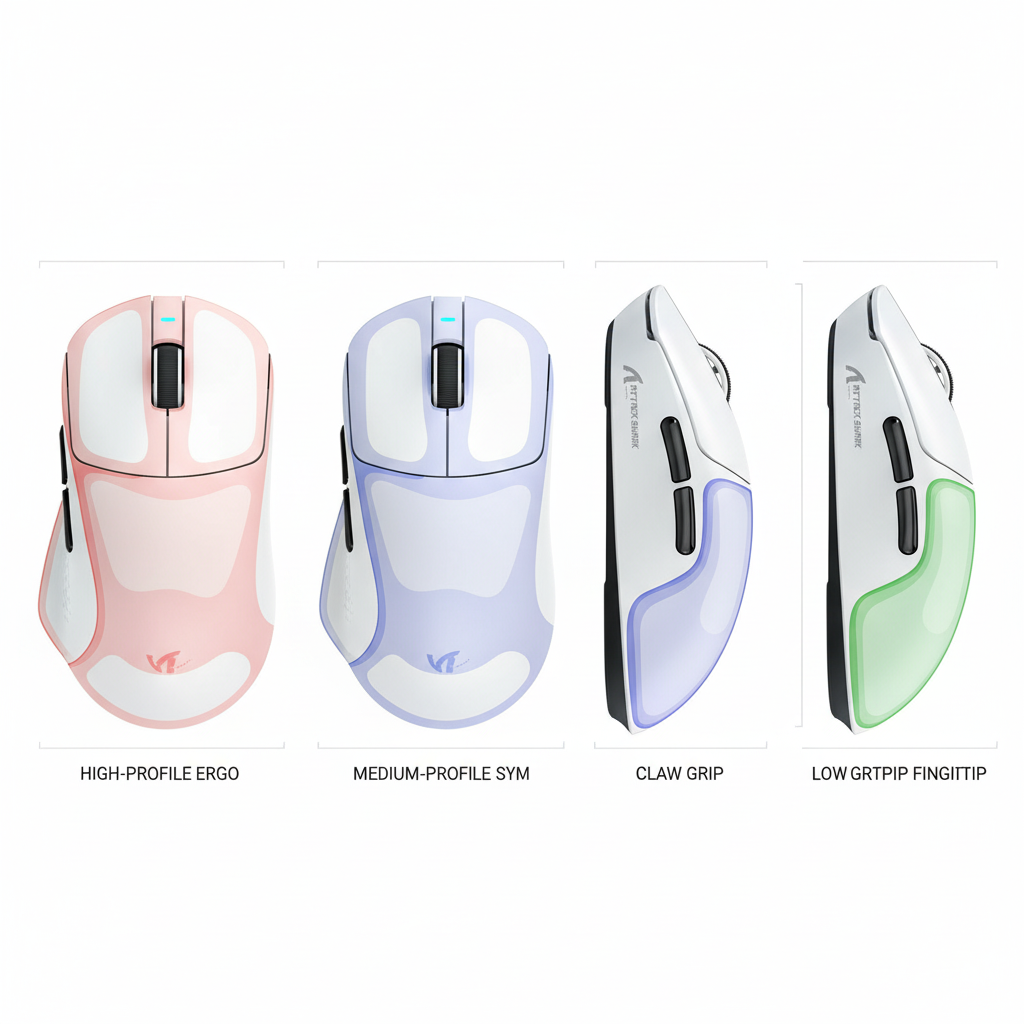
The "hump"—the highest point of the mouse shell—is the most critical geometric feature. It acts as the primary pivot point where the mouse meets the hand. Its placement determines whether a mouse feels like an extension of your arm or a foreign object you are struggling to move.
1. Central Hump (The Palm Grip Standard)
For palm grip users, the hump should ideally be positioned in the center to fully fill the arch of the palm. This prevents the knuckles from collapsing into an unnaturally high arch, which can lead to wrist strain. If the hump is too far forward, it forces a "forward-leaning" grip that puts excessive pressure on the fingertips, reducing the range of motion for vertical adjustments.
2. Rear Hump (The Claw Grip Sweet Spot)
Claw grip users typically benefit from a hump that is lower and positioned further back. This provides a stable base for the knuckles to rest against while allowing the fingers to curl aggressively toward the buttons.
- Expert Insight: Popular aggressive claw grips are often biomechanically suboptimal. They can promote hyperextension of the proximal interphalangeal (PIP) joints. A rearward hump facilitates this grip by providing a pivot point, but users should be aware of the trade-off: you gain short-term flick control at the potential expense of long-term joint health.
3. Low Profile (Fingertip Precision)
Fingertip grip users generally require a flatter, lower-profile shell. Since the palm never touches the mouse, a high hump only serves as an obstruction, limiting the "vertical micro-adjustments" you can make by pulling the mouse into your palm with your fingers. Fingertip Precision: Why Mid-Point Weighting Wins for Pros explores how weight distribution interacts with these low-profile shapes to enhance speed.

Side-Wall Curvature and the "Pinch" Point
While the hump gets most of the attention, the side-wall curvature (the "waist" of the mouse) is what provides stability.
- Inward Curves: A pronounced inward curve near the front provides a precise "pinch" point. This is excellent for control during high-speed movements. However, if the curve is too aggressive, it can create pressure points on the thenar eminence (the fleshy part of the thumb), leading to cramping.
- Flared Backs: Some ergonomic shapes flare out at the back to support the pinky and ring finger. While this feels comfortable, it can make the mouse feel "locked in," making it harder to perform the subtle rotations needed for tracking moving targets.
We recommend looking for "safe" shapes—those with moderate curves that allow for slight grip adjustments during a match. A shape that is too specialized often forces you into a single hand position, which increases the risk of repetitive strain. Why Side-Wall Curvature Matters for Competitive Grip Stability provides a deeper dive into how these curves affect your "stop" control.
Materials, Coatings, and the Fatigue Factor
The surface of the mouse is your only interface with the hardware. A common mistake in the budget tier is overlooking how coating wear alters ergonomics over time.
- Glossy vs. Matte: Glossy finishes can provide excellent grip for dry hands but become slick with even a small amount of moisture. This forces the user to grip the mouse harder to maintain control, leading to rapid hand fatigue. For long-term value, a high-quality matte or textured finish is a smarter investment.
- Ultralight Dynamics (<60g): Transitioning to an ultralight mouse is a major ergonomic shift. Reduced inertia means you will likely overflick initially.
- The Recalibration Period: Based on common patterns from customer support and community feedback, it takes approximately 1 to 2 weeks of deliberate practice to recalibrate muscle memory for a sub-60g mouse. During this time, we suggest lowering your sensitivity slightly to regain precise "stop" control.
Modeling Note (Recalibration Parameters): This model represents the typical adjustment period for a user moving from a standard (~85g) mouse to an ultralight (~55g) model.
Parameter Value/Range Unit Rationale Initial Over-flick Error 15–20 % Estimated based on inertia reduction Sensitivity Adjustment -5 to -10 % Recommended starting offset Daily Practice Required 30–60 Minutes Standard muscle memory acquisition Full Recalibration Time 7–14 Days Observed user feedback loop Grip Tension Increase High (Temporary) N/A Natural reaction to lower weight Boundary Conditions: This model may not apply to users already using high-friction "control" pads or those with pre-existing motor control conditions.
Technical Synergy: When Shape Meets 8000Hz Performance
In the modern competitive landscape, ergonomics cannot be separated from technical performance, specifically high polling rates like 8000Hz (8K). According to the Global Gaming Peripherals Industry Whitepaper (2026), the integration of high-frequency data and physical design is the new frontier of "smart design."
The 8K Math and Your Setup
When using an 8000Hz polling rate, the mouse sends data every 0.125ms. This is a massive leap from the 1.0ms interval of standard 1000Hz mice.
- Motion Sync Latency: Modern sensors use "Motion Sync" to align mouse data with your PC's poll. At 1000Hz, this adds ~0.5ms of delay. However, at 8000Hz, this delay scales down to ~0.0625ms, making it virtually imperceptible.
- The CPU Bottleneck: Be aware that 8K polling is not a "free" upgrade. It puts a significant load on your CPU's IRQ (Interrupt Request) processing. We strongly advise against using USB hubs or front-panel case headers for 8K devices; they must be plugged directly into the motherboard's rear I/O to avoid packet loss and jitter.
IPS and DPI Saturation
To actually benefit from 8K, you need to provide enough data. The formula is: Packets sent per second = Movement Speed (IPS) x DPI.
- At 800 DPI, you must move the mouse at least 10 IPS to saturate the 8000Hz bandwidth.
- At 1600 DPI, you only need to move at 5 IPS. Using a slightly higher DPI (like 1600) is often a "smart investment" for 8K users, as it ensures the high polling rate remains stable even during slow, precise micro-adjustments.
Trust, Safety, and Compliance: The "Value" of Certification
For the budget-conscious gamer, "value" also means safety. Many challengers in the market skip expensive certifications to lower costs, but this can lead to issues with wireless interference or battery safety.
When selecting a wireless ergonomic mouse, verify that it meets international standards. Look for FCC certification for radio frequency safety and EU Radio Equipment Directive (RED) compliance. These ensure that your "tri-mode" (Bluetooth/2.4GHz/Wired) mouse won't interfere with other devices or suffer from sudden dropouts during a match.
Furthermore, because high-performance mice use high-capacity lithium batteries, ensure the device complies with UN 38.3 for transport safety. This is a critical "trust" factor—a cheap mouse that lacks these safeguards is a poor investment if it poses a fire risk or is seized by customs during shipping.
Finding the Balance
The anatomy of an ergonomic gaming mouse is a complex interplay of biomechanics, material science, and high-speed data processing. For the value-oriented gamer, the goal isn't to find the most expensive mouse, but the one that offers the best "performance-per-dollar" without compromising on hand health.
By focusing on hump placement, side-wall curvature, and verified technical standards, you can move beyond the marketing hype and make a scientific selection. Remember: the best sensor in the world is useless if your hand is too tired to move it.
References
- ISO 9241-400:2007 - Ergonomics of human-system interaction
- Global Gaming Peripherals Industry Whitepaper (2026)
- FCC Equipment Authorization Database
- Adductor Pollicis Muscle Function - Wikipedia
- UN Manual of Tests and Criteria (Section 38.3)
Disclaimer: This article is for informational purposes only and does not constitute professional medical advice. Ergonomic needs vary significantly by individual. If you experience persistent pain, numbness, or tingling in your hands or wrists, please consult a qualified healthcare professional or physiotherapist. The technical data regarding polling rates and latency is based on theoretical modeling and standard industry specifications; individual system performance may vary based on hardware configurations.

コメントを書く
このサイトはhCaptchaによって保護されており、hCaptchaプライバシーポリシーおよび利用規約が適用されます。