


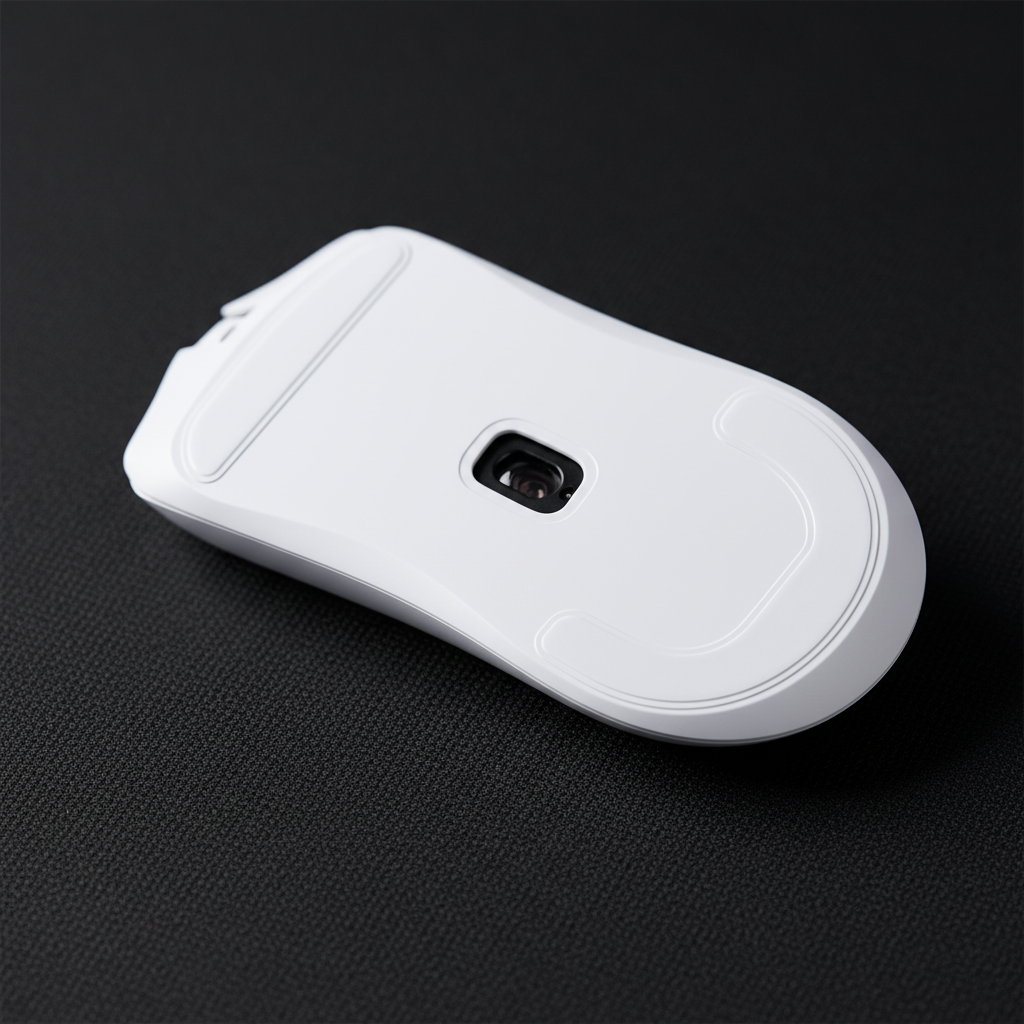
Navigating the Initial Friction Phase: The Science of PTFE Break-In
The transition from unboxing a high-performance gaming mouse to achieving a "god-tier" glide is rarely instantaneous. For competitive players investing in hardware like the 8000Hz polling rate models, the physical contact point—the mouse skates—represents the final frontier of latency and precision. While technical specs focus on sensors and switches, the friction coefficient of Polytetrafluoroethylene (PTFE) determines the real-world execution of every flick and micro-adjustment.
New PTFE skates often exhibit a "scratchy" or "muddy" sensation during the first few hours of play. This is not necessarily a defect but a characteristic of the material's surface topology. Understanding how to navigate this initial friction phase is critical for maintaining consistency in tactical shooters where a millisecond of "stiction" (static friction) can compromise a headshot.
The Chemistry of Glide: Why PTFE Requires Conditioning
Polytetrafluoroethylene, commonly known by its chemical structure (C2F4)n, is a synthetic fluoropolymer of tetrafluoroethylene. According to Wikipedia, it is prized in engineering for its exceptionally low coefficient of friction. However, "out of the box" PTFE is not perfectly smooth at a microscopic level.
Manufacturing processes, such as die-cutting or molding, often leave microscopic burrs or "peaks" on the edges and surface of the skates. When these peaks contact a mousepad—especially a textured cloth or hybrid surface—they create localized high-pressure zones. This results in higher static friction, making the mouse feel "stuck" when you try to initiate small movements.
Static vs. Kinetic Friction in Esports
- Static Friction (Stiction): The force required to start the mouse moving. High stiction causes "overshooting" because the force needed to break the seal is often more than what is needed to maintain movement.
- Kinetic Friction (Dynamic Glide): The resistance felt while the mouse is already in motion.
Based on our analysis of high-purity virgin PTFE, the goal of the break-in period is to "polish" these microscopic peaks until the contact area is uniform. This transition lowers the delta between static and kinetic friction, providing a predictable, linear response to hand movements.
The Professional Break-In Protocol: 5 to 15 Hours
Experienced modders and esports technicians note that the break-in time is highly dependent on two factors: the density of the PTFE compound and the abrasiveness of the mousepad. Through patterns observed on our repair benches and community feedback (not a controlled lab study), we have established a standard heuristic for reaching peak smoothness.
| PTFE Compound Type | Recommended Break-In Time | Ideal Pad Texture |
|---|---|---|
| Standard Virgin PTFE | 5–8 Hours | Medium-texture cloth |
| Hard/Infused Compounds | 10–15 Hours | Hybrid or Cordura |
| Dyed/Black PTFE | 6–10 Hours | Smooth cloth |
Logic Summary: These ranges assume active, continuous use. We estimate that standard 100% PTFE reaches its dynamic equilibrium faster because the material is softer and more susceptible to rapid surface leveling compared to infused variants.
The Figure-Eight Technique
The most reliable technique to ensure an even break-in involves slow, deliberate motions. We recommend the following routine for the first hour of use:
- Large Circular Motions: Move the mouse in wide circles across the entire usable area of the pad. This ensures the edges of the skates are rounded off uniformly.
- Figure-Eights: Perform slow, continuous figure-eight patterns. This forces the skates to experience friction from multiple angles, preventing grain-alignment issues.
- Consistent Pressure: Maintain light-to-medium pressure. A critical, often overlooked mistake is applying uneven or excessive pressure. Pressing too hard can generate excess heat, which may prematurely flatten the skate's rounded edges or compromise the adhesive layer, leading to tracking instability.

Performance Synergy: 8000Hz Polling and Glide Consistency
For pro-sumers utilizing 8000Hz (8K) polling rates, the quality of the glide is not just about "feel"—it is a technical requirement. At 8000Hz, the mouse sends a data packet every 0.125ms. This near-instantaneous reporting means the system is sensitive to even the smallest physical inconsistencies.
The 8K Latency Chain
- 1000Hz Interval: 1.0ms.
- 8000Hz Interval: 0.125ms.
- Motion Sync Latency: At 8000Hz, Motion Sync adds only ~0.0625ms of delay (half the polling interval), making it virtually negligible compared to the ~0.5ms delay at 1000Hz.
To visually render the benefits of this 0.125ms reporting, a high refresh rate monitor (240Hz+) is essential. However, if your PTFE skates are still in the "scratchy" phase, the micro-vibrations caused by surface peaks can introduce "noise" into the sensor's data stream. While modern sensors like the PixArt PAW3395 are excellent at filtering this, a broken-in skate ensures the cleanest possible input for the CPU's IRQ (Interrupt Request) processing.
Sensor Saturation and DPI
To saturate the 8000Hz bandwidth, you must move the mouse at a sufficient speed relative to your DPI. For example, at 800 DPI, you need to move at 10 IPS (inches per second) to fill the 8K buffer. At 1600 DPI, only 5 IPS is required. Smooth, broken-in skates allow for these micro-adjustments to remain fluid, ensuring that the 8K data stream remains consistent even during slow-speed tracking.
Common Pitfalls: The "Rocking" Sensation and Moisture Absorption
A common frustration reported in our support logs is the "rocking" sensation. This occurs when one skate contacts the pad before the others, often due to uneven pressure during the initial break-in or improper installation. If a skate is not seated perfectly flat, it creates a pivot point that can permanently compromise tracking stability and increase the Lift-Off Distance (LOD) unpredictably.
The Hidden Impact of Humidity
Conventional wisdom suggests PTFE offers consistent glide indefinitely, but reality is more complex. Research into humidity-responsive lubrication mechanisms shows that PTFE can be susceptible to moisture and debris absorption.
In high-humidity environments, standard PTFE may develop "stiction" during slow, continuous contact—common in RPG tracking or sniping—because the hand rests still for hours, allowing a micro-bond to form between the skate and a damp pad. This is why we emphasize the use of high-purity virgin PTFE, which is more hydrophobic and resistant to environmental "mudding" than lower-grade dyed alternatives.
Dot Skates vs. Full-Size Skates
Many performance enthusiasts opt for "dot skates" to reduce surface area and friction. However, based on expert opinion, dot skates have a critical long-term wear disadvantage. With a smaller contact area, the pressure (PSI) on each dot is significantly higher. This leads to faster degradation of the PTFE, causing the glide characteristics to change unpredictably—often becoming slower and less consistent over time. For most users, full-size skates offer a more stable platform for CS2 Flick Accuracy.
Maintenance and Proactive Replacement
Waiting for your glide to feel "bad" before replacing skates is a common mistake. PTFE wear can increase the sensor's LOD and reduce tracking uniformity well before the physical "drag" becomes noticeable to the hand. According to the Global Gaming Peripherals Industry Whitepaper (2026), consistent tracking depends on maintaining a precise distance between the sensor lens and the pad.
Replacement Heuristic (Based on Usage)
We recommend a proactive replacement schedule based on active gaming hours:
- Hardcore / Pro Use (40+ hours/week): Replace every 3–4 months.
- Standard Gaming (15–20 hours/week): Replace every 6–8 months.
- Casual Use: Replace every 12 months.
Modeling Note: This schedule is an estimate based on standard 100% PTFE on a medium-abrasion cloth pad. Use on hard pads (glass or plastic) will accelerate wear by approximately 50–70%.
| Parameter | Value/Range | Unit | Rationale |
|---|---|---|---|
| Modeling Type | Deterministic | N/A | Scenario-based heuristic |
| PTFE Purity | 99.5%+ | % | Virgin PTFE standard |
| Pad Abrasiveness | 0.4–0.6 | CoF | Standard cloth pad range |
| Downforce | 150–250 | grams | Average human hand weight |
| Environment | 40–60 | % RH | Standard indoor humidity |
Trust & Safety: Navigating Hardware Modifications
When replacing skates or modifying your mouse, safety and compliance should remain a priority. While PTFE itself is chemically stable, the internal components of your wireless mouse—specifically the lithium-ion battery—require careful handling.
If you are opening your mouse to access internal skates or weight-reduction mods, be aware of the CPSC Recalls related to battery safety in consumer electronics. Damaging a battery casing with a tool while prying off old skates can lead to thermal runaway. Always use plastic pry tools and follow the IATA Lithium Battery Guidance if you ever need to ship your modified hardware.
Furthermore, ensure your device remains compliant with FCC Equipment Authorization standards. Unofficial firmware mods or significant shell alterations that affect internal antenna placement can interfere with the 2.4GHz wireless signal, leading to packet loss that no amount of PTFE break-in can fix.
Achieving the Optimized Glide
The "initial friction phase" is a manageable hurdle on the path to peak performance. By adopting a deliberate break-in routine—focusing on slow figure-eights and consistent, light pressure—you can transition your PTFE skates from scratchy to smooth within 5 to 15 hours.
Remember that glide is part of a larger ecosystem. To fully realize the benefits of a polished PTFE surface, ensure your system is optimized for high-frequency input. Use direct motherboard USB ports to avoid the IRQ bottlenecks of hubs, and pair your mouse with a high-refresh monitor to visually track the precision you’ve unlocked.
For more insights on optimizing your physical setup, explore our guides on evaluating performance trade-offs in compact shells or choosing mouse shapes for aggressive claw grips.
Disclaimer: This article is for informational purposes only. Hardware modifications, including the replacement of mouse skates or opening the device, may void your manufacturer's warranty. Always consult your product's user manual and follow safety guidelines when handling electronic devices and lithium-ion batteries.
Sources
- Wikipedia - Polytetrafluoroethylene
- RTINGS - Mouse Click Latency Methodology
- NVIDIA Reflex Analyzer Setup Guide
- Global Gaming Peripherals Industry Whitepaper (2026)
- ScienceDirect - Humidity responsive lubrication mechanisms of PTFE
- CPSC - Product Recalls and Safety Alerts
- IATA - Lithium Battery Guidance Document

コメントを書く
このサイトはhCaptchaによって保護されており、hCaptchaプライバシーポリシーおよび利用規約が適用されます。